

You have read the guides. You know you should open a Roth IRA at Fidelity and buy SPUS. You have $1,000 ready to deposit. And you are staring at fidelity.com not entirely sure which button to press first.
This post solves that. Exact steps. Exact menu paths. Every field you will see. No financial theory — you already know the why. This is the how.
Estimated time: 20 minutes from start to first SPUS purchase.
Before You Begin — What You Need

Your Social Security Number
Your employer's name and address (can skip if unemployed/student)
Your bank account routing number and account number (for funding — found on a check or in your bank app)
A beneficiary's full name, SSN, and date of birth (spouse or family member — you can add this later but do not skip it)
Your annual contribution amount in mind: $7,000 maximum for 2026 if under 50; $8,000 if 50+
Income check before starting: Roth IRA eligibility phases out at $150,000–$165,000 MAGI for single filers and $236,000–$246,000 for married filing jointly (2026 limits). If your income is above these thresholds, you need the Backdoor Roth strategy (covered in Step 9 below) rather than a direct Roth IRA contribution.
Step 1: Navigate to the Right Page

Go to fidelity.com. At the top navigation, look for "Open an Account" — it appears in the top right of the desktop site or under the menu on mobile.
Click "Open an Account." You will see a screen listing account types. You want "Roth IRA". It is listed under the "Retirement" category. Click it.
If you already have a Fidelity account (brokerage, 401k, etc.), log in first, then open a new account — Fidelity links all accounts under one login, which makes it easier to manage.
Step 2: Complete the Application (10 Minutes)
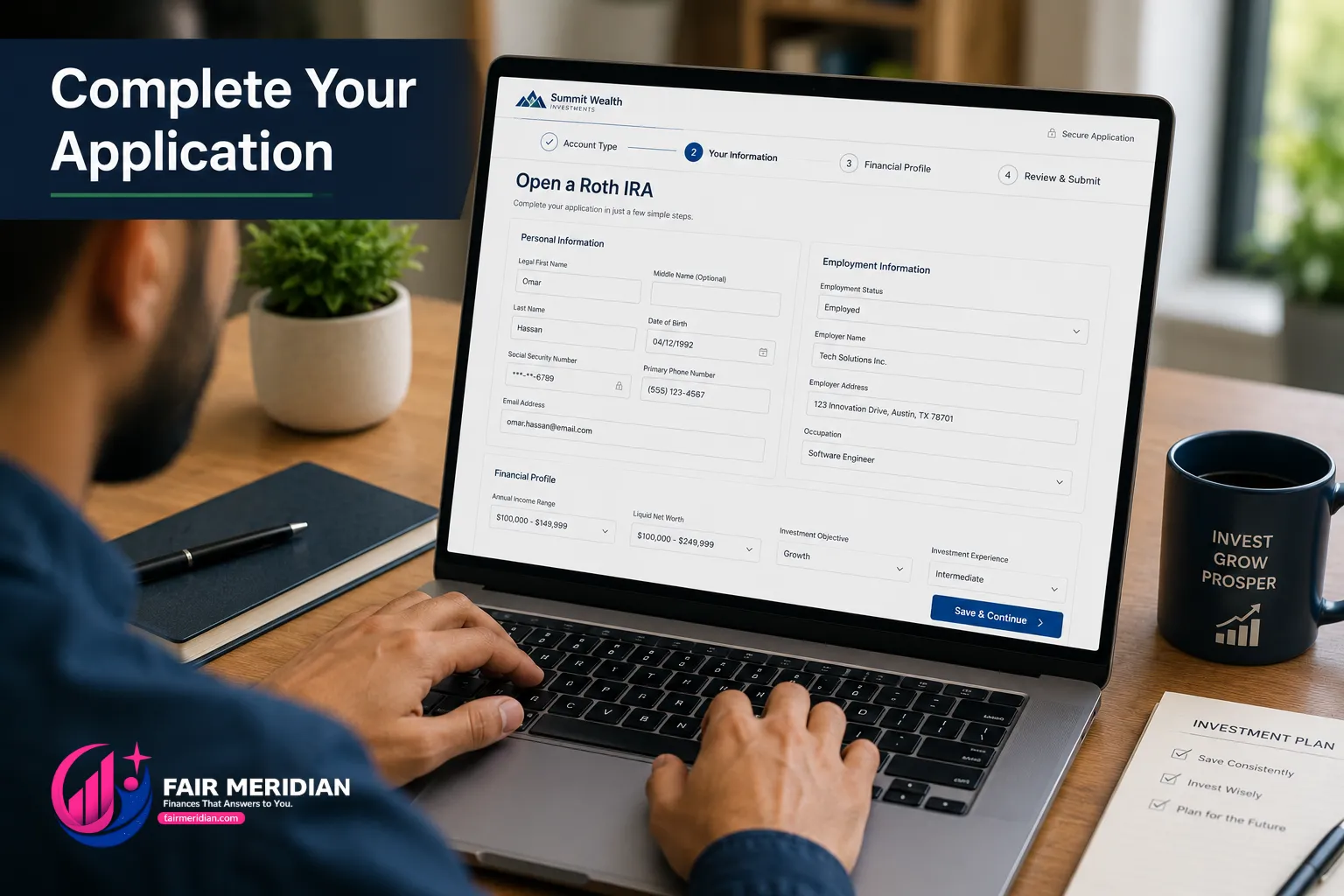
The Roth IRA application at Fidelity takes approximately 10 minutes. Here is every field you will see and what to enter:
Personal Information
Legal name — exactly as it appears on your government ID
Date of birth — used to confirm contribution limits (under 50 vs 50+)
Social Security Number — required by federal law for all investment accounts
Address — your current residential address (not P.O. Box)
Phone number and email — Fidelity will use these for account notifications
Employment Information
Employment status: Employed, Self-Employed, Retired, Student, or Homemaker
Employer name and address (if employed): Enter your company name and address. If self-employed, enter your business name or your own name.
Occupation: Choose from the dropdown that best describes your role.
Financial Profile
Annual income range: Choose from the provided ranges — this is for regulatory purposes only, not used to calculate your contribution limit.
Liquid net worth: Your approximate liquid assets (savings, investments, not including home equity). Choose the closest range.
Investment objective: Select "Growth" if you are under 50 or "Growth and Income" if 50+. This is a regulatory classification, not a restriction on what you can buy.
Investment experience: Select your honest level — this affects account features but not your ability to buy SPUS.
Regulatory Questions
"Are you a senior executive or 10%+ shareholder of a publicly traded company?" — almost certainly No for most readers.
"Are you employed by or associated with a FINRA member firm?" — No for most readers unless you work at a brokerage or financial firm.
"Are you a US citizen or US resident alien?" — Yes for most readers. Non-resident aliens cannot open Fidelity accounts.
Account Agreement
Review and accept the Fidelity account agreement. The Roth IRA terms confirm that you understand the contribution limits and tax treatment. Read the key terms; accept when ready.
Step 3: Fund Your Account
After the application is submitted (usually approved instantly), you need to fund the account to start investing.
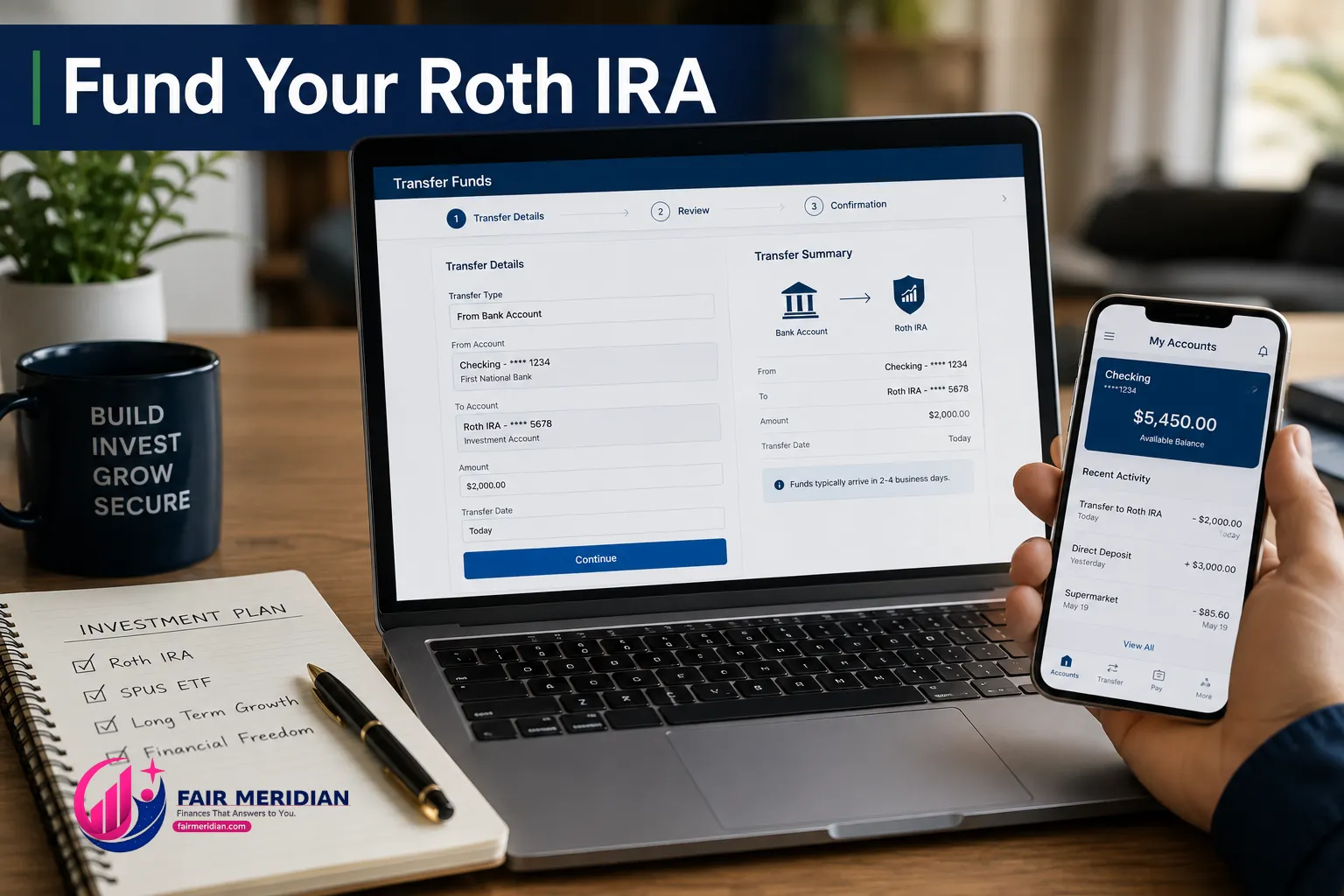
Option A: Electronic Bank Transfer (Recommended)
On the account confirmation screen or inside your new account, click "Transfer Money" or "Add Money."
Select "From a Bank Account"
Enter your bank's routing number (9-digit number on the bottom left of any check) and your account number
Fidelity will make two small verification deposits to your bank (usually $0.01–$0.99) within 1–2 business days. Confirm these amounts in your bank app to verify the link.
After verification, transfer your contribution amount. Standard processing time: 2–4 business days for funds to settle and become available to invest.
Option B: Wire Transfer (Faster)
If you want to invest immediately, initiate a wire transfer from your bank to Fidelity. Wires typically settle same-day. Fidelity's wire instructions are found under Account → Transfers → Wire Money. Most banks charge $15–$25 for outgoing wires.
How Much to Transfer
Transfer your full 2026 annual contribution if possible: $7,000 (under 50) or $8,000 (50+). You can contribute the 2026 maximum any time between January 1, 2026 and April 15, 2027.
If $7,000 is too much at once, start with whatever you can ($500, $1,000, $2,000) and add more throughout the year. There is no minimum investment at Fidelity.
Step 4: Buy SPUS — Your First Trade

Once your funds are settled, navigate to your Roth IRA account. Look for the "Trade" button — on desktop it appears in the account header; on mobile it is in the account menu.
Click "Trade" (or "Buy/Sell")
In the search box, type "SPUS" and select it from the dropdown. You will see: SP Funds S&P 500 Sharia Industry Exclusions ETF (SPUS) — NYSE Arca
Action: Select "Buy"
Order type: Select "Market" for your first purchase (executes immediately at the current price). Once you are comfortable, you can use "Limit" orders to specify your maximum price.
Quantity: Choose between "Dollars" (recommended) or "Shares"
If buying by Dollars: type your amount (e.g., $1,000 or $7,000). Fidelity's fractional shares feature ("Stocks by the Slice") means any dollar amount works — even $10.
If buying by Shares: SPUS trades at roughly $48–$52/share (May 2026). Enter the number of whole shares you want.
Review the order summary — confirm you see "SPUS" and the correct dollar amount or share count
Click "Preview Order" then "Place Order"
Your first halal investment is complete. A market order executes within seconds during trading hours (9:30 AM – 4:00 PM ET, Monday–Friday). You will receive a trade confirmation by email.
Step 5: Set Up Automatic Monthly Investment (Critical)

This step is the one most new investors skip — and it is the most important for long-term wealth building. Fidelity's automatic investment feature lets you buy SPUS on a fixed schedule without logging in each time.
Navigate to your Roth IRA account
Look for "Automatic Investments" under "Accounts & Trade" in the main menu, or search for it in Fidelity's search bar
Click "Set Up Automatic Investment"
Select your Roth IRA as the account
Select SPUS as the investment
Set your monthly amount: $583/month to reach $6,996/year (just under the $7,000 limit with rounding). Use $667/month for the $8,000 limit (age 50+).
Set the start date to the first of next month
Select your linked bank account as the funding source
Confirm and save
From this point, Fidelity will automatically transfer $583 from your bank to your Roth IRA and buy SPUS on the first of every month — with no action required from you. This is dollar-cost averaging: buying consistently regardless of whether SPUS is up or down that month.
The 30-year math: $583/month into SPUS, assuming a conservative 9% average annual return (SPUS has returned approximately 12.4% YTD 2026; long-run S&P 500 historical average is ~10%): after 30 years, your account grows to approximately $950,000 — completely tax-free. All of it. No capital gains tax. No ordinary income tax on withdrawal. This is the power of the Roth IRA structure combined with halal ETF growth.
Step 6: Enable Dividend Reinvestment (DRIP)

SPUS pays small dividends periodically. Enabling dividend reinvestment automatically buys more SPUS shares with every dividend — compounding your returns without any action from you.
In your Roth IRA account, look for "Dividends and Capital Gains" settings (found under "Account Features" or "Position Details" for SPUS)
For SPUS, select "Reinvest"
Save the preference
From now on, every SPUS dividend is automatically converted into additional SPUS shares. On a $50,000 portfolio, SPUS's approximate dividend yield (~0.8%) adds roughly $400/year in automatically reinvested shares.
Step 7: Set Your Beneficiary

This takes three minutes and is critically important for Islamic estate planning. Without a beneficiary designation, your Roth IRA passes through your estate — potentially subject to probate and not following Islamic inheritance principles.
In your account, navigate to "Profile" → "Beneficiaries" (on desktop) or search "Beneficiary" in Fidelity's search
Click "Add Beneficiary" for your Roth IRA
Add your primary beneficiary — typically your spouse if married, or your children if single
Enter: Full legal name, relationship, date of birth, Social Security Number, percentage (100% if one beneficiary; split among multiple)
Optionally add a contingent beneficiary — who receives the account if the primary predeceases you
Save and confirm
Islamic estate planning note: A Roth IRA beneficiary designation overrides your will — the named beneficiary receives the account directly, bypassing probate. For Islamic inheritance compliance, ensure your beneficiary designation aligns with your Islamic will (wasiyyah). If your Islamic inheritance plan involves distributing assets among multiple heirs at specific Islamic shares (faraid), work with an Islamic estate planning attorney to coordinate your Roth IRA beneficiary with your broader estate plan.
Step 8: Set Up Your Annual Purification Tracker

SPUS publishes an annual purification amount each year — the amount per share you must donate to charity to purify any residual prohibited income in the fund's holdings. For 2025, this was $0.18 per share.
The easiest tracking method:
Every December, note your total SPUS share count in your Roth IRA
Visit spfunds.com and find the current year's published purification amount
Multiply: shares × purification per share = total purification donation
Donate this amount to any charity alongside (or as part of) your annual zakat
Example: You hold 200 shares of SPUS by December 2026. Purification amount for 2026: $0.18/share (2025 rate; 2026 will be published after fiscal year end). Total purification: 200 × $0.18 = $36. Donate $36 to any charitable cause.
Step 9: If Your Income Is Too High — The Backdoor Roth
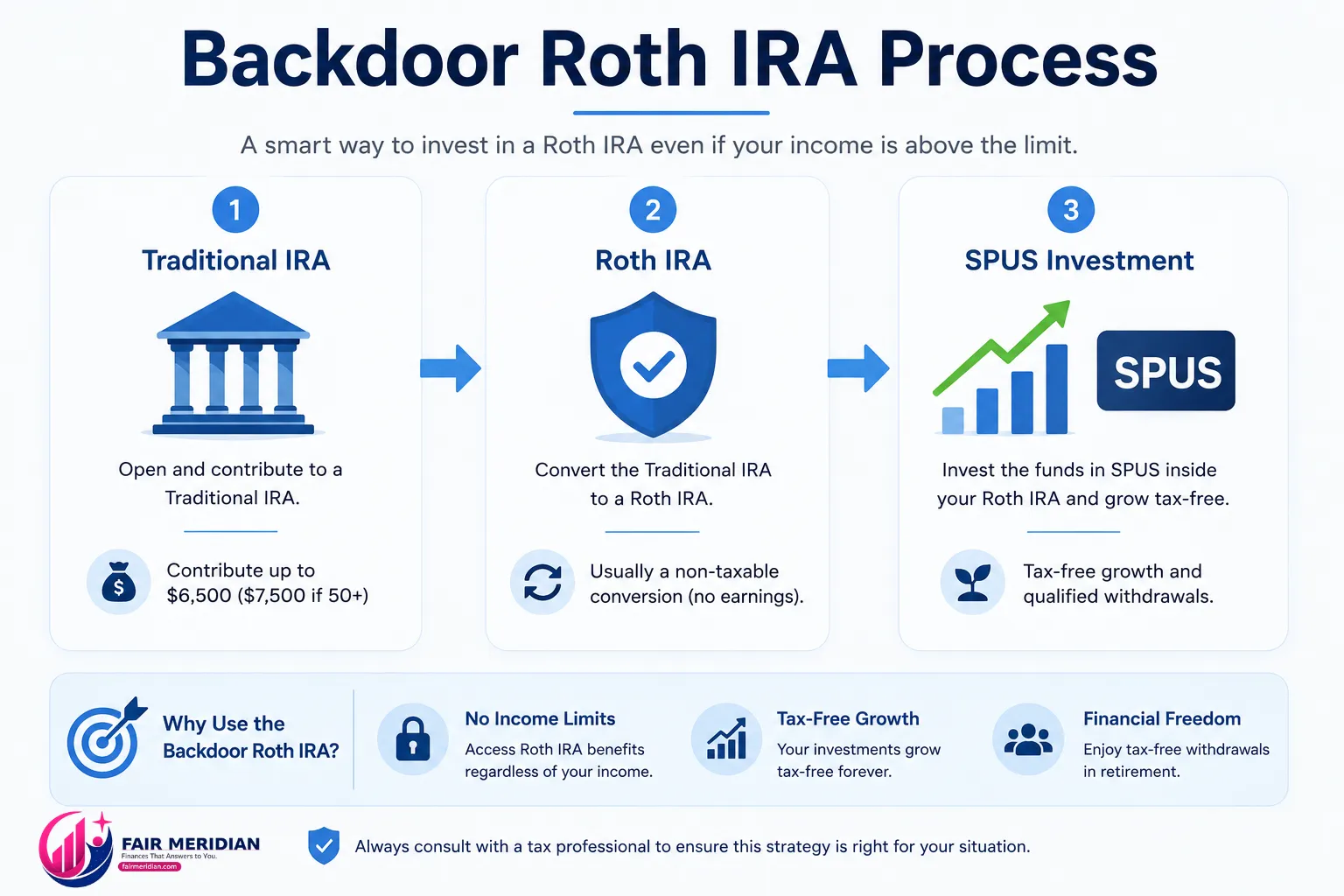
If your 2026 MAGI exceeds $165,000 (single) or $246,000 (married filing jointly), you cannot contribute directly to a Roth IRA. Use the Backdoor Roth instead:
Open a Traditional IRA at Fidelity (same process as above, but select "Traditional IRA" instead of "Roth IRA")
Contribute $7,000 to the Traditional IRA as a non-deductible contribution (no income limit applies to Traditional IRA contributions, only to the deductibility)
Wait 1–3 days for the contribution to settle
Convert to Roth: In your Traditional IRA, look for "Convert to Roth IRA" (under "Accounts & Trade" or in the account menu). Select the full amount. This moves the money to your Roth IRA.
File IRS Form 8606 with your tax return to report the non-deductible Traditional IRA contribution. This prevents you from paying income tax on the conversion.
Important — the pro-rata rule: If you have other Traditional IRA funds anywhere (not 401k), the conversion will be partially taxable. Consult a tax advisor before proceeding if you have existing Traditional IRA balances.
Then invest the converted funds in SPUS within your Roth IRA using Steps 4–8 above. The Backdoor Roth achieves the same result as a direct Roth contribution — permanent tax-free growth in SPUS — regardless of income level.
Your Complete Halal Roth IRA Setup Checklist
Step | Action | Time Required | Done? |
|---|---|---|---|
1 | Open Roth IRA at fidelity.com | 10 min | ☐ |
2 | Link bank account and transfer funds | 5 min (+ 2–4 days to settle) | ☐ |
3 | Buy SPUS with settled funds | 2 min | ☐ |
4 | Set up $583/month automatic investment in SPUS | 3 min | ☐ |
5 | Enable dividend reinvestment (DRIP) for SPUS | 2 min | ☐ |
6 | Add beneficiary designation | 3 min | ☐ |
7 | Set December calendar reminder for purification calculation | 1 min | ☐ |
8 | Set April 15 reminder for prior-year contribution deadline | 1 min | ☐ |

Frequently Asked Questions
Can I buy SPUS in a Roth IRA at Fidelity?
Yes. SPUS (SP Funds S&P 500 Sharia ETF, ticker: SPUS, NYSE Arca) is available commission-free at Fidelity in any account type including Roth IRA. Fidelity's fractional shares feature allows you to buy any dollar amount of SPUS — even $10 — with no minimum investment.
Is there a minimum to open a Roth IRA at Fidelity?
No. Fidelity Roth IRAs have no minimum opening deposit and no annual account fee. You can open the account with $0 and fund it later. However, you need at least the price of one SPUS share (~$48–$52) or any dollar amount to buy SPUS via the fractional shares feature ("Stocks by the Slice").
What is the Roth IRA contribution deadline for 2026?
The contribution deadline for tax year 2026 is April 15, 2027. You can make your 2026 contribution any time from January 1, 2026 through April 15, 2027. Earlier is better — every month your money sits in SPUS rather than a bank account is a month of halal tax-free growth.
Should I also add AMAL to my Roth IRA?
AMAL (Saturna Al-Kawthar Participation ETF) is the sukuk-based fixed income alternative — it pays ~4.2% annual yield from rental income on real assets rather than interest. For investors under 40, an all-SPUS allocation is reasonable — you have time to ride equity volatility. For investors in their 40s or older, a 15–30% AMAL allocation alongside SPUS provides stability. Use our Halal Investing Guide for the full age-based allocation table.
You now have a fully operational halal Roth IRA: SPUS buying automatically every month, dividends reinvesting, beneficiary set, purification tracked. The entire setup took under 20 minutes. The wealth it builds over the next 20–30 years is permanently tax-free.
For the complete halal retirement strategy beyond the Roth IRA — Solo 401k, SDIRA, and employer negotiation — read our Halal 401k & Retirement Planning Guide.